How to Withdraw Money from 88DD Game - Payment Methods
Ready to cash out your 88DD Game winnings? This step-by-step guide shows you exactly how to withdraw money from 88DD in Pakistan — the process, timing, and what to check before you request a payout.
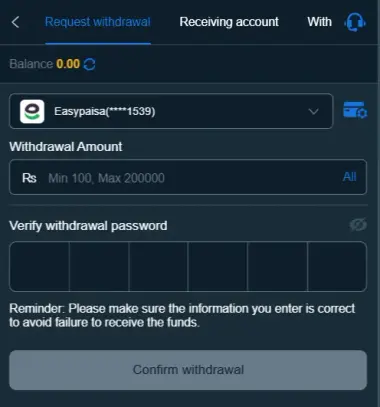
Withdrawing money from 88DD Game is simple when your account has a withdrawable balance and your payment details are correct. Depending on the options available in your account, you may be able to withdraw via Easypaisa, JazzCash, bank transfer, or USDT — the same methods available when you make a deposit. Before submitting a request, check the current withdrawal limit, available payment methods, and any account or bonus conditions shown on the withdrawal page.
To ensure a smooth withdrawal, always use your own payment account and enter the receiving details carefully. Even a small error in a mobile number, bank account, or crypto wallet address can delay the transaction. Processing times and available methods may vary, so the information displayed in your 88DD account should be treated as the latest reference.
88DD Game Withdrawal Steps
Follow these steps to request a withdrawal from your 88DD Game account.
Step 1: Log In to Your 88DD Account
Open the 88DD Game app or website, then sign in with your registered login credentials. Make sure you are accessing the correct account before starting the withdrawal process.
Step 2: Open the Withdrawal Section
After logging in, go to your Wallet, Cashier, or Withdrawal section. The name or location of this option may vary by the current version of the platform.
Step 3: Check Your Withdrawable Balance
Before entering an amount, check your available balance and confirm that the funds are eligible for withdrawal. If your balance includes promotional or bonus funds, additional terms may apply before those funds can be withdrawn.
Step 4: Choose Your Payment Method
Select the payment method you want to use from the options available in your account. These may include JazzCash, Easypaisa, bank transfer, or USDT. Choose the method that is currently supported and most convenient for you.
Step 5: Enter Your Payment Details
Enter the required information for your selected payment method. For Easypaisa or JazzCash, enter the correct mobile wallet number. For a bank transfer, provide the requested bank details. If you are using USDT, enter the correct wallet address and the supported network.
Always double-check these details before proceeding because incorrect information can cause unnecessary delays or payment issues.
Step 6: Enter the Withdrawal Amount
Enter the amount you want to withdraw, then check the minimum withdrawal requirement displayed on the current withdrawal page. Make sure the requested amount does not exceed your available withdrawable balance.
Step 7: Review Your Withdrawal Request
Before confirming, carefully review the withdrawal amount, payment method, receiving details, and any applicable conditions or fees. This quick check can help prevent common mistakes.
Step 8: Submit the Request
Once everything is correct, submit your withdrawal request. Depending on your account or payment method, you may need to complete an additional verification step before your request is accepted.
After submitting the request, save your transaction ID, reference number, or a confirmation screenshot to keep a record of the transaction.
Step 9: Track Your Withdrawal
You can usually track your request in Withdrawal History or Transaction History. Your request may appear as pending, processing, completed, or rejected.
If the request is still being processed, avoid submitting another withdrawal for the same amount. Allow the existing request to complete, and contact the official support channel if it remains unresolved beyond the stated processing period.
How to Withdraw Money from 88DD to JazzCash?
If JazzCash is available in your 88DD account, select it as the withdrawal method and enter your correct mobile wallet details. Enter the withdrawal amount, review the information carefully, then submit the request.
Ensure the JazzCash number is yours and entered correctly. After submitting the request, keep the transaction reference and check your JazzCash account once the withdrawal is processed.
How to Withdraw Money from 88DD to Easypaisa?
To withdraw via Easypaisa, open the withdrawal section and select Easypaisa if it is available. Enter your Easypaisa mobile number, specify the amount, review the details, and confirm.
After submitting the request, monitor its status in your transaction history. Never share your Easypaisa PIN, OTP, password, or any other confidential security information with anyone.
How to Withdraw Money from 88DD to a Bank Account?
If Bank Transfer is available, select it from the withdrawal options and enter the required bank details. Carefully review the account details before submitting the request.
Bank withdrawals may require additional information or verification, depending on the payment method. Keep your transaction reference until the funds have successfully reached your bank account.
How to Withdraw 88DD Money Through USDT?
If USDT is supported on your account, select USDT as the withdrawal method and enter the required cryptocurrency wallet information.
Before confirming the transaction, carefully verify both the wallet address and the network. They must match the platform's requirements. A cryptocurrency transaction sent to an incorrect address or an unsupported network may not be recoverable.
How Long Does an 88DD Withdrawal Take?
Payment Method: Processing times may vary among Easypaisa, JazzCash, bank transfer, and USDT.
Account Verification: Additional verification may take extra time if required.
Payment Provider: Delays can sometimes occur during payment-network processing.
Transaction Status: Check your Withdrawal or Transaction History for the latest status.
Best Practice: Follow the processing time shown in your current 88DD account instead of relying on a fixed time.
88DD Withdrawal Minimum and Fees
The minimum withdrawal amount and any applicable charges may change over time. Before submitting your request, review the withdrawal page for the current minimum amount, available payment methods, and applicable fees.
This is especially important if you are making a small withdrawal because a minimum limit or a processing fee may affect the amount you receive.
What to Do If Your 88DD Withdrawal Is Pending?
If your withdrawal is marked Pending, follow these steps:
Check Transaction History:
Open your withdrawal history to review the current status.
Wait for the Stated Processing Time:
Give the payment the required time to process.
Check Payment Details:
Make sure your JazzCash, Easypaisa, bank, or USDT information is entered correctly.
Complete Verification:
Check whether 88DD has requested any additional verification for the account.
Keep Your Transaction ID:
Save the reference number or transaction ID for future support.
Contact Official Support:
If the withdrawal remains pending after the stated processing period, contact the official 88DD support channel.
Protect Your Account:
Never share your password, OTP, PIN, or verification code with anyone who claims they can manually release your withdrawal.
Common 88DD Withdrawal Problems and Solutions
Withdrawal Option Is Not Available
Check whether your account meets the current withdrawal requirements and whether you have reached the minimum required amount. Also check whether the payment method is currently supported.
Withdrawal Request Is Rejected
Review your payment details and account information. Incorrect or mismatched receiving details can prevent a request from being completed. If everything looks correct, contact official support for further assistance.
Withdrawal Is Taking Too Long
First, check the transaction status. If it is still processing, allow the stated processing period to pass. If the transaction remains unresolved, contact official support using your withdrawal reference.
Funds Are Not Showing in Your Wallet or Bank
Confirm that the 88DD transaction is marked as completed and verify the receiving account details. If the platform shows the payment as completed but the funds have not appeared, contact the relevant payment provider and 88DD support with your transaction details.
Bonus Balance Cannot Be Withdrawn
If part of your balance comes from a promotional offer, review the applicable bonus terms. Some promotional balances may have specific conditions that must be met before they become eligible for withdrawal.
Tips for a Smooth 88DD Withdrawal
- Use a payment account registered in your name where required.
- Check your mobile wallet or bank account details before submitting.
- Confirm the minimum withdrawal amount shown on the current page.
- Review any bonus or promotional terms and conditions.
- Keep your transaction ID or withdrawal receipt.
- Avoid submitting duplicate withdrawal requests while one is pending.
- Use official 88DD support if you need assistance.
- Never share your password, PIN, OTP, or verification codes with anyone.
Final Thoughts
Withdrawing money from 88DD Game is straightforward if your account is eligible and your payment information is entered correctly. Log in, open the Withdrawal section, check your available balance, select a supported payment method, enter the required details, and submit your request. Afterward, you can monitor the transaction in your withdrawal history.
Because payment methods, withdrawal limits, fees, verification requirements, and processing times may change, always review the information in your current 88DD account before making a withdrawal. For your account security, use official access points and support channels, and keep your payment credentials private.